Project Overview
In this project, I designed and built a segmented, security-focused home network based on common enterprise network practices. My goal was to practice hands-on skills in network segmentation, VLAN configuration, firewall design, secure Wi-Fi setup, and network-wide ad/malware blocking, important areas for IT support, networking, and cybersecurity.
Environment
| Component | Technology |
|---|---|
| Firewall | pfSense+ |
| Network Switch | Managed VLAN-capable switch |
| Wireless | UniFi Wi-Fi 6 Access Point |
| Hypervisor | Proxmox VE |
| Virtual Machines | UniFi Controller (Ubuntu Server), future lab VMs |
| Client Devices | Windows, Android, IoT devices, Guest devices |
Network Design
Created a VLAN-based architecture to segment the network:
- VLAN 10 — Management (network equipment, firewall, AP controller)
- VLAN 20 — Trusted Devices (personal laptops, desktops, servers)
- VLAN 30 — IoT Devices (smart TVs, streaming devices, home automation)
- VLAN 40 — Guest Devices (internet-only guest Wi-Fi)
- VLAN 50 — Server/Lab (virtual machines, isolated test environment)
Firewall Rules Implemented
VLAN 10 — Management
- Allow access from Trusted VLAN
- Block access from IoT, Guest, Lab VLANs
- Allow optional internet access for firmware updates
VLAN 20 — Trusted
- Full internet access
- Access to Management VLAN
- Selective casting to IoT devices
- Block access to Guest and Lab VLANs
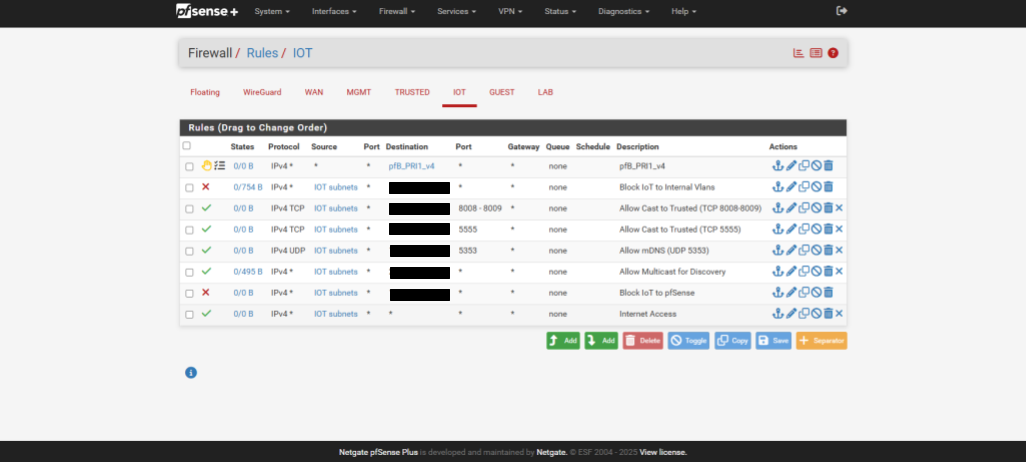
VLAN 30 — IoT
- Outbound internet access
- Allow casting services to Trusted VLAN
- Block access to Management VLAN and internal VLANs
- Block access to pfSense Web GUI
VLAN 40 — Guest
- Internet-only access
- Block access to all internal VLANs
- Device isolation within VLAN
VLAN 50 — Lab
- Outbound internet access
- Block access to Management, Trusted, IoT, Guest VLANs unless specifically allowed
Wi-Fi Configuration
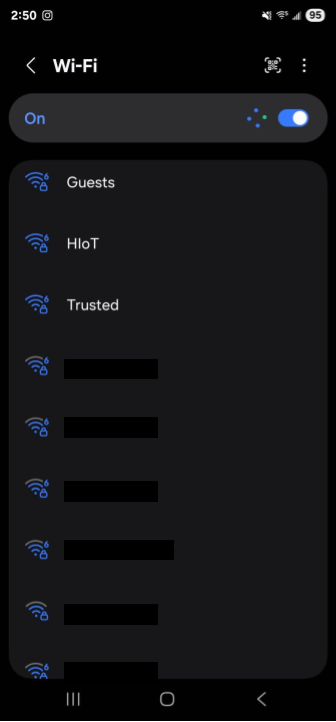
Created VLAN-tagged SSIDs:
- Trusted Wi-Fi → VLAN 20
- IoT Wi-Fi → VLAN 30
- Guest Wi-Fi → VLAN 40
Optimized AP settings:
- Band Steering enabled
- Client isolation enabled for Guest Wi-Fi
- mDNS and multicast allowed for casting
- Management traffic on separate VLAN

Ad & Malware Blocking
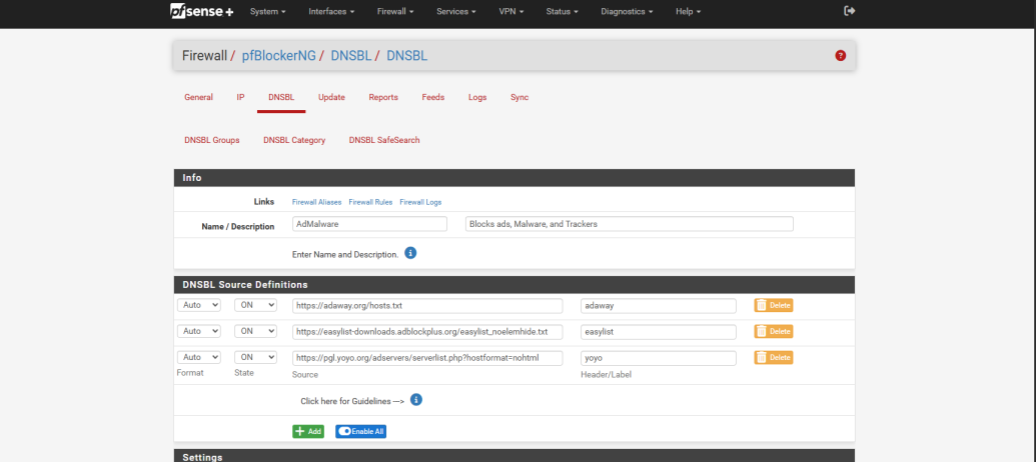
Implemented network-wide DNS-based blocking using pfBlockerNG-devel:
- DNSBL feeds: StevenBlack, AdAway, YoYo
- Blocked known ad, tracking, and malware domains
- DNSBL logging enabled
- Confirmed noticeable reduction in ads and tracking on network devices
Testing & Validation
- Verified IP assignment and DHCP scopes per VLAN
- Tested firewall rules for proper segmentation
- Confirmed casting services between IoT and Trusted VLANs
- Verified DNSBL blocking on Trusted and IoT VLANs
- Tested Wi-Fi SSIDs for correct VLAN tagging
- Confirmed switch was properly handling tagged traffic
Challenges & Solutions
VLAN Tagging + Switch Compatibility
Challenge: Initial VLAN config caused loss of connectivity
Solution: Refined switch port tagging and PVID settings; ensured correct management VLAN use
VLAN DHCP and IP assignment
Challenge: Trusted VLAN devices not getting correct IPs
Solution: Corrected pfSense VLAN interface assignments and DHCP server settings
Proxmox VM Connectivity
Challenge: VM not receiving VLAN-tagged traffic properly
Solution: Fixed Proxmox bridge settings; removed unneeded VLAN tags at VM level
AP Adoption and Controller Connectivity
Challenge: AP adoption failed when connected via switch
Solution: Corrected AP port tagging; configured AP to use VLAN 20 for management; set static IP via pfSense DHCP mapping
DNSBL Configuration
Challenge: UI differences in pfBlockerNG-devel required clarification
Solution: Followed reliable setup process; verified blocking without false positives
Outcome
This project resulted in a secure, segmented, and optimized home network that mirrors enterprise network design. The environment now supports:
- Strong VLAN-based segmentation
- Firewall-based access control
- Per-VLAN Wi-Fi SSIDs
- Network-wide ad/malware blocking
- Scalable virtual network infrastructure for future testing and labs
This project strengthened my skills in network design and firewall management. It reinforced the importance of carefully planning changes and thoroughly testing configurations before applying them in a live environment.